
How to Make the Lamine Yamal Rabona AI Video From One Photo (3 Steps)
How to make the Lamine Yamal AI video: upload 1 photo to get the 9-second fake rabona clip with the original sound in your phone browser for $9.90.
 Ozil AI Team11 min read
The team behind Ozil AI writes step-by-step guides to the Ozil goal AI trend, with screenshots from our own maker.

TL;DR — You make the Lamine Yamal AI video by uploading 1 photo to Lamine Yamal Rabona AI on Ozil AI, right in your phone or computer browser. A few minutes later, you've got the real 9-second clip of Yamal's fake rabona, with your person on the ball and the clip's original sound. There's no CapCut, app, template link, prompt or account, and one 720p video is $9.90, paid once.
A comment under the viral grandma version asks "how to create?".
Most tutorials that try to answer send you into an app or push a template link that doesn't even feature Yamal's clip.
You'll lose ten minutes downloading tools and end up with the wrong video.
You only need 1 photo in your browser to get the real move.
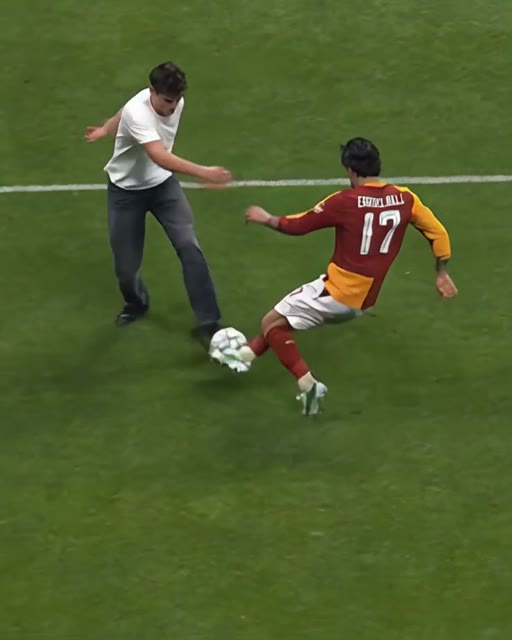
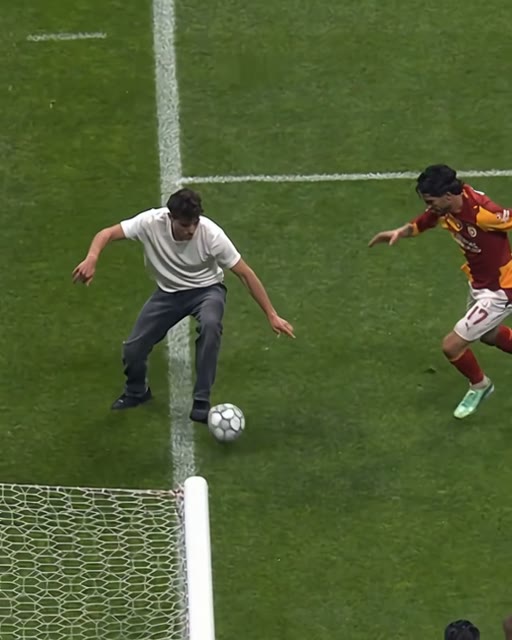
Here's our own sample: one picture of an AI-made young man in a cream T-shirt and dark jeans went in. He does the full fake rabona in his own clothes, in every single frame.
Here's what you'll get:
- The 3 steps: How to make your Lamine Yamal AI video on your phone.
- The best photo: The kind of photo that works best.
- Straight answers: Replies to the questions people ask in the comments.
How Do You Make the Lamine Yamal AI Video?
To make the Lamine Yamal AI video, you upload 1 photo to our maker. A few minutes later, you'll get a 9-second, 4:5 MP4 of that person doing Yamal's fake rabona in the real match footage. It comes with the clip's original sound.
You don't have to cut clips or line up audio tracks yourself. It all runs in your browser.
- What stays: The red-and-yellow #17 defender and his slide stay just as they were. So do the ball and every touch, the pitch, the white lines, the goalpost and net, the light, the camera move and the timing.
- What changes: The player on the ball gets the face, hair and body from your photo. With Keep My Look, they keep your outfit too, and it's the same person from the first frame to the last.
- The sound: The clip's original sound plays from the first second of the video.
You can upload your picture to our Lamine Yamal rabona AI maker whenever you're ready to start.
What Happens in the 9-Second Lamine Yamal AI Video?
The Lamine Yamal AI video is 9 seconds of the real match footage from Barcelona's 4-1 Champions League win at Galatasaray in Istanbul on October 13, 2026. Your person is the one on the ball.
It's one continuous shot with no cut, filmed from above and following the player along the touchline.
During that move, Yamal took his left leg behind his right as if for a rabona (a kick where the kicking leg swings behind the standing leg). He touched the ball toward defender Eren Elmali and pulled it straight back with his left foot. Then he set up Anthony Gordon's goal in the 53rd minute.
Yamal used the move to dribble, not to shoot. That's why fans call it a fake rabona.
- 0-2.5 seconds: The player carries the ball along the line, with one arm out for balance.
- 2.7-4.5 seconds: The defender in red and yellow, #17, slides in from the right.
- 4.5-5.5 seconds: The player swings one leg behind the standing leg for the fake rabona and drags the ball back.
- 5.5-6.5 seconds: The defender is left stretching on the grass.
- 6.5-9 seconds: The player drives toward the goal line, and the post and net come into the frame.
What Do You Need to Make a Lamine Yamal AI Video?
To make a Lamine Yamal AI video, you need three things: 1 photo, a web browser on a phone, tablet or computer, and $9.90 for a 720p video.
You don't have to install any software or build an edit timeline.
- The photo: You'll need 1 clear photo of yourself, an adult friend, or a character.
- The browser: You'll need any web browser on an iPhone, Android phone, tablet or computer.
- The payment: You'll need $9.90 to cover a 720p video.
You don't need anything else — no clip to find, no prompt, no editing, and no app.
What Are the 3 Steps to Make the Lamine Yamal AI Video?
To make the Lamine Yamal AI video, you upload 1 photo and pick the look and the size. Then you press Create, pay once and download the 9-second MP4.
It all happens on one page.
Step 1: Upload One Clear Photo
Open ozil-ai.com/lamine-yamal-rabona-ai in your browser on your phone or computer. Tap the "Upload photo" box under "Your photo" and pick 1 photo from your camera roll.
Tick the box confirming you have the right to use the photo and that anyone in it is 18 or older.

Step 2: Pick Keep My Look or Match Kit
Keep My Look (the default) keeps the face, hair, body and outfit from your photo. That's how your nan can do the move in her cardigan.
Match Kit keeps the face, hair and body. It puts your person in a plain black long-sleeved football shirt with purple trim, purple shorts and black socks, with no crest and no sponsor.
Both looks cost the same. Then pick 480p, 720p or 1080p.

Step 3: Press Create, Pay Once and Download
The price is on the Create button before you pay ("Create · $9.90" at 720p). You pay once. There's no subscription, and you don't need an account.
The video starts on the same page, and it's ready in a few minutes. You'll download a 4:5 MP4 with the original sound and no watermark on exported video, ready for TikTok and Reels.
If a video fails, the credits come back on their own.

Can You Make the Lamine Yamal AI Video Without CapCut?
Yes, Ozil AI makes the Lamine Yamal AI video in the browser on your phone or computer, so there's nothing to install.
A CapCut template is a ready-made edit inside the CapCut app that you drop your own photo into. Most TikTok tutorials for this trend carry a "CapCut · Try this template" link and the tags #capcut and #capcutpioneer.
- The trend's template: It's called "lamine yamal", by BatToS, and it was published on October 15, 2026. It had more than 50,000 uses by October 17.
- The wrong template: Some tutorials link the "Ai" template by Future301, made on October 10, 2026, three days before the match. It shows a player in a Brazil kit, which led viewers under one of those tutorials to comment "fake" and "it don't work".
- The price: CapCut sells its AI features with credits, and the template page doesn't show what one use costs.
Here, you get the real 9-second match footage with the original sound from one photo, and the price sits right on the Create button.
You can read what the Lamine Yamal CapCut template does to see the details of that setup. Or see the Lamine Yamal rabona AI generators side by side to compare how each tool handles the trend.
It's much simpler to make the Lamine Yamal AI video in your browser directly.
Can You Put Yourself or Your Grandma in a Lamine Yamal AI Video?
Yes, anyone you've got a photo of can do the fake rabona.
- Yourself: Upload a photo of you.
- An adult friend or family member: Anyone in the photo has to be 18 or older.
- A character: A cartoon, game or AI-made character works too.
The maker puts that exact person onto the ball.
A grandma in a headscarf was the first big AI version on TikTok. That video went up on October 14, 2026, the day after the match, and it's passed 1.3 million plays and 58,400 likes.
She keeps her headscarf, cardigan and skirt through the whole move. Keep My Look keeps your person's outfit the exact same way.
You can read how the Lamine Yamal fake rabona AI trend started to see how the meme spread.
It takes just a minute to put your grandma in Yamal's fake rabona using a clear photo.
If you've got a friend who'd rather score a goal, try Ozil Goal AI to put them inside Mesut Özil's famous finish instead.
What Photo Works Best for a Lamine Yamal AI Video?
The best photo for a Lamine Yamal AI video shows one person or one character, face clear and facing the camera, in good light. Full body works best.
Following those basics gives you the cleanest look in every frame.
- The subject: One person or one character per photo.
- The direction: Face turned toward the camera.
- The lighting: Clean, good light across the face and body.
- The framing: Full-body framing so the outfit carries into the video with Keep My Look.
- The age: An adult 18 or older for any real person.
The face, hair, body and (with Keep My Look) outfit in the video all come from this one photo.
Our sample's picture showed his face and his full outfit, and he keeps the cream T-shirt and dark jeans through all 9 seconds.

Lamine Yamal AI Video FAQ
How long is the Lamine Yamal AI video?
The Lamine Yamal AI video is 9 seconds long, from the carry along the touchline to the drive toward the goal line. It's a 4:5 MP4, the same tall frame as the original clip.
Does the Lamine Yamal AI video have the original sound?
Yes, every video keeps the clip's original sound playing from the first second. On TikTok, the audio track on the original post is listed as "Solace" by Txmy.
Does it work on iPhone and Android?
Yes, it runs in the web browser of any phone, iPhone or Android, plus tablets and computers. You don't have to download or install anything to make your video.
Do I need an account to make a Lamine Yamal AI video?
No, you don't need an account to make your clip. You press Create, pay once, and the video starts on the same page.
To open your videos later, sign in with the link sent to the email you paid with.
Do I need a prompt for the Lamine Yamal AI video?
No, you don't need a prompt. The real match footage, the 9-second run and the sound are already built in.
If you're curious what a written prompt for this edit looks like, here's the copy-ready Lamine Yamal rabona AI prompt.
Where can I find the Lamine Yamal clip for edits?
You don't need to look for a clip. The real 9-second match clip and its sound are built into our Lamine Yamal rabona AI maker.
The footage everyone's remaking is the Champions League's own 9-second TikTok of the move, which passed 55.9 million plays.
How much does a Lamine Yamal AI video cost?
One 9-second 720p video is $9.90, paid once, with no subscription.
The $9.90 pack gives you 500 credits. That covers a 720p clip (500 credits) or a 480p clip (375 credits).
The price sits on the Create button before you pay. A 1080p video takes 1,480 credits from the $39.90 pack of 2,400 credits.
You can see every credit pack on the pricing page, and credits stay valid for 365 days.
Ready to Make Your Lamine Yamal AI Video Now?
Turning 1 photo into the real 9-second fake rabona clip with the original audio takes only a few minutes, right in your phone's browser.
You won't have to touch a video editor or dig through confusing apps.
Go ahead and create your Lamine Yamal AI video for $9.90 and have it ready for your group chat tonight.
Related Articles
- What Is the Lamine Yamal Fake Rabona AI Trend? (Real vs AI) — the real Champions League move, the grandma version, and how the AI remakes took off.
- Lamine Yamal CapCut Template Not Working? Here's Why — which template the tutorials link, and what to use instead.
- Best Lamine Yamal Rabona AI Generators (2026): 9 Tools Compared — every tool that makes the trend, compared.
- Lamine Yamal Rabona AI Prompt (Copy-Ready) — and How to Skip the Prompt Entirely — a prompt for the move, if you want to write your own.

