
Lamine Yamal Rabona AI Prompt (Copy-Ready) — and How to Skip the Prompt Entirely
Lamine Yamal rabona AI prompt: the real copy-ready edit prompts behind Ozil AI's Keep My Look and Match Kit, or skip the prompt with 1 photo for $9.90.
 Ozil AI Team19 min read
The team behind Ozil AI writes step-by-step guides to the Ozil goal AI trend, with screenshots from our own maker.

TL;DR — The Lamine Yamal rabona AI prompt is a video edit prompt for the real 9-second match clip of Yamal's fake rabona and 1 photo. It swaps Yamal for the person in your photo. The defender in red and yellow, the camera and every touch of the ball stay the same.
Here's the Keep My Look prompt Ozil AI runs, word for word:
Edit the video. Replace the footballer with the ball in the black long-sleeved shirt with purple trim, purple shorts and black socks with whoever is in @Image 1 (a person, or a cartoon or game character when @Image 1 shows one): their face, hair, body and whole outfit come from @Image 1 only. They do not wear the black and purple kit, and do not have the footballer's dark curly hair, unless @Image 1 shows them. Keep everything else exactly unchanged: every movement, every touch of the ball and the path of the ball, the defender in the red and yellow kit and his slide, the camera movement, framing, the pitch, the white lines, the goalpost and net, the light and the timing.Don't want to write a prompt? Upload 1 photo to Lamine Yamal Rabona AI and you'll get the 9-second video with the clip's original sound. That's $9.90 for one 720p video.
Under a grandma doing Yamal's fake rabona with 1.3 million plays on TikTok, people ask "how to create?".
You won't find the real answer in basic image prompts.
The prompt Media.io hands you describes the move in words for a tool that makes brand-new clips. Media.io's own trend guide says the result is "a fictional football animation based on a user-provided photo, not authentic match footage".
TikTok tutorials send you to a CapCut template instead of handing you a prompt. Here's what the Lamine Yamal CapCut template does.
Below are the real prompts behind Ozil AI's two looks for this trend, copied straight from the maker. You'll also see how to skip typing altogether. Here's what's inside:
- 3 copy-ready prompts: You get the Keep My Look prompt and both steps for Match Kit.
- The five-part formula: You learn how video edit prompts handle the subject, action, scene, style and camera.
- Six habits: You see the six rules that keep the defender, the pitch and the ball path in place.
- The one-photo route: You can skip every line and let our maker run the edit for you.
What Is the Lamine Yamal Rabona AI Prompt?
The Lamine Yamal rabona AI prompt is a video edit prompt (a prompt that changes a clip you already have instead of making a new one).
You'll give it to an AI video editor with the real clip and 1 picture. The prompt tells the editor who to swap out (the player on the ball) and what to keep (everything else).
- The clip: You use the real Champions League clip of Yamal's fake rabona against Galatasaray. It runs 9 seconds in 4:5 (a tall frame, 4 wide for every 5 high), and it's one continuous shot with no cut.
- The picture: You add 1 photo of the person or character you want to put on the ball.
- The editor: You open an AI video editor. It's one that changes a clip you've already got, using a reference photo (the picture the AI copies a face and look from).
- The sound: It's the clip's original audio. You lay it back under the video after the edit finishes.
These are the prompts our Lamine Yamal Rabona AI maker runs behind its two looks, Keep My Look and Match Kit. They're word for word, as of October 17, 2026.
Here's a quick look at all three prompts.
| Prompt | Words | What you attach | What you get |
|---|---|---|---|
| Keep My Look | 123 | Your photo and the 9-second clip | You on the ball in your own clothes |
| Match Kit, step 1 | 169 | Your photo and a picture of the kit | One picture of you in the kit, full body and face |
| Match Kit, step 2 | 113 | The step 1 picture and the 9-second clip | You on the ball in the black and purple kit |
Want to know how the clip took over social feeds? It's all in the story of the Lamine Yamal fake rabona AI trend.
This is what the Lamine Yamal rabona AI video looks like in Keep My Look, with the clip's original sound. It's the man from the photo, in his own cream T-shirt and dark jeans, through the whole move.
How Is a Lamine Yamal Rabona AI Prompt Built?
A Lamine Yamal rabona AI prompt has 5 parts: subject, action, scene, style and camera. Only the subject changes. The other 4 tell the editor to keep the real footage.
| Part | What the real prompt says | What it does |
|---|---|---|
| Subject | "Replace the footballer with the ball in the black long-sleeved shirt with purple trim, purple shorts and black socks" | Points at Yamal by his kit, so the defender in red and yellow stays as he is. |
| Action | "every movement, every touch of the ball and the path of the ball" | Sits in the keep list. The run, the fake rabona and the drag-back all come from the clip, so you never describe them. |
| Scene | "the pitch, the white lines, the goalpost and net" | Keeps the real Champions League pitch from the match footage. |
| Style | "Keep everything else exactly unchanged" and "the light" | Keeps the look of the real match footage, because nothing asks for a new one. |
| Camera | "the camera movement, framing" and "the timing" | Keeps the one unbroken shot that follows the play from above, and every beat of the 9 seconds. |
Every quote in the table comes from the Keep My Look prompt, and Match Kit uses the same lines.
The only part that differs between the two looks is who comes in and what they wear.
Keep My Look says "their face, hair, body and whole outfit come from @Image 1 only". Match Kit says "their whole outfit is the football kit they wear in @Image 1" instead.
It's the same build as the Ozil goal AI prompt, with a new clip, a new kit and a line about hair.
Don't want to paste them? You can also let our Lamine Yamal Rabona AI maker fill in every line from 1 photo.
What Is the Keep My Look Prompt for the Lamine Yamal Rabona AI Video?
The Keep My Look prompt puts the person in your photo on the ball in Yamal's fake rabona, in their own clothes. Their face, hair, body and whole outfit all come from your photo.
It works for a person or a cartoon or game character, so your grandma can do the fake rabona in her cardigan.
Edit the video. Replace the footballer with the ball in the black long-sleeved shirt with purple trim, purple shorts and black socks with whoever is in @Image 1 (a person, or a cartoon or game character when @Image 1 shows one): their face, hair, body and whole outfit come from @Image 1 only. They do not wear the black and purple kit, and do not have the footballer's dark curly hair, unless @Image 1 shows them. Keep everything else exactly unchanged: every movement, every touch of the ball and the path of the ball, the defender in the red and yellow kit and his slide, the camera movement, framing, the pitch, the white lines, the goalpost and net, the light and the timing.Here's how you use the Keep My Look prompt in an AI video editor:
- Upload a photo: You attach your reference picture first. That's @Image 1 (the first picture you attach).
- Add the clip: You attach the real 9-second match clip as the video to edit.
- Enter the prompt: You paste the full Keep My Look prompt into the prompt box.
- Keep the shape: You set the output frame to 4:5 if your tool asks for a shape. That's the shape the clip already has.
- Add the sound: You put the match clip's original sound back under the video once the visual edit finishes.
On Ozil AI, this exact prompt runs when you pick Keep My Look in our Lamine Yamal rabona AI generator. It's the default look.
On October 17, 2026, we ran the Keep My Look prompt, word for word, on the real clip. We used one picture of an AI-made man in a cream T-shirt, dark jeans and black sneakers.

The top is the photo that went in as @Image 1, and the bottom row is what the Keep My Look prompt gave back.
You're looking at the same four moments:
- At 1 second: The man from the photo runs with the ball along the line.
- At 4.6 seconds: The defender in the red and yellow #17 shirt slides in.
- At 5.5 seconds: The leg swings behind for the fake rabona.
- At 8 seconds: The player on the ball drives to the goal line, with the post and net in the corner.
What Is the Match Kit Prompt for the Lamine Yamal Rabona AI Video?
The Match Kit prompt puts the person in your photo in a kit like the clip's. That's a plain black long-sleeved shirt with purple trim, purple shorts and black socks, with no crest and no sponsor.
It runs in 2 steps. First you make a picture of that person in the kit, then you run the edit.
Step 1: Make a Photo of the Person in the Kit
Step 1 makes a two-panel picture of the person from your photo, wearing the kit. You'll attach 2 pictures:
- Reference image 1: Your photo goes first.
- Reference image 2: The kit picture goes second.

That's the kit picture Ozil AI attaches as reference image 2.
Use the person in reference image 1 and the football kit in reference image 2. Make one photo of the person from reference image 1 wearing exactly the football kit from reference image 2 (a plain black long-sleeved football shirt with thin purple trim on the collar and the cuffs, purple football shorts and black football socks) and black football boots. Keep the person's face, skin tone, facial features, hairstyle and hair colour exactly as in reference image 1; nothing of their own clothes stays. One image split into two side-by-side panels on a plain light grey studio background: the left panel is a full-body shot of the person standing relaxed, facing the camera, head to boots fully in frame; the right panel is a close-up portrait of the same person's face and shoulders, looking into the camera. Same person, same kit, same lighting in both panels. Photorealistic, sharp focus. No text, no captions, no watermark, no logos, no brand marks, no sponsor names, no club badges, no numbers.This prompt asks for 1 image split into 2 panels side by side on a plain light grey background. The left panel shows the full body, head to boots. The right panel is a close-up portrait.
It keeps the person's face and hair, and it makes sure "nothing of their own clothes stays". On Ozil AI, the image comes out in a wide 3:2 shape (3 wide for every 2 high), so both panels fit cleanly.
Step 2: Edit the Clip With the Kit Photo
Step 2 takes your new picture and puts it into the match clip. You'll attach two things:
- @Image 1: You upload the two-panel kit picture created in step 1.
- The video: You attach the real 9-second clip of the fake rabona.
Edit the video. Replace the footballer with the ball in the black long-sleeved shirt with purple trim, purple shorts and black socks with the person in @Image 1: their face, hair and body come from @Image 1, and their whole outfit is the football kit they wear in @Image 1, the black long-sleeved shirt with purple trim, the purple shorts, the black socks and the boots. Keep everything else exactly unchanged: every movement, every touch of the ball and the path of the ball, the defender in the red and yellow kit and his slide, the camera movement, framing, the pitch, the white lines, the goalpost and net, the light and the timing.Only one part differs from Keep My Look: the part that says who comes in and what they wear.
On Ozil AI, Match Kit is the second option on the same switch, and it's the same price.
How Do You Get a Lamine Yamal Rabona AI Prompt Right?
Six habits from the real Lamine Yamal rabona AI prompt get the edit right.
You name Yamal by his kit and leave the fake rabona out. You say what doesn't carry over and list what stays. Then you use a full-body photo and add the sound last.
They control who gets replaced, what stays untouched and how the footage lines up. Following these rules keeps the original defenders, timing and pitch intact.
Name Yamal by His Kit, Not His Name
The prompt picks out the player on the ball by his black long-sleeved shirt with purple trim, purple shorts and black socks. Naming him by what he wears sets him apart from the defender in the red and yellow kit.
The prompt doesn't use a player's name.
Leave the Fake Rabona Out of the Prompt
The prompt never describes the dribble, because the moves are already in the clip. AP describes the real move as "taking his left leg behind the right leg to touch the ball toward his opponent before quickly bringing it back to himself with his left foot".
So the prompt leaves all of that to the clip. It just tells the editor to keep "every movement".
Say What Doesn't Carry Over: the Kit and the Curly Hair
The prompt explicitly stops Yamal's specific features from showing up on the new person. It tells the editor: "They do not wear the black and purple kit, and do not have the footballer's dark curly hair, unless @Image 1 shows them."
That's what keeps the person from your photo looking like themselves, instead of picking up Yamal's kit or curls.
List Everything That Stays the Same
The keep list names 12 things, from every touch of the ball to the goalpost and net. That's how everything but the player on the ball stays exactly as it was in the clip:
- The moves: The prompt preserves every movement, every touch of the ball and the path of the ball.
- The defender: The prompt keeps the defender in the red and yellow kit and his slide.
- The camera: The prompt maintains the camera movement and the framing.
- The pitch: The prompt keeps the pitch, the white lines, the goalpost and net.
- The light and timing: The prompt holds the original light and the 9-second timing.
Use a Full-Body Photo With a Clear Face
The maker sums up the best starting picture in its own words: "One person or one character per photo, face clear, facing the camera, in good light. Full body works best."
Your photo doesn't need a ball, boots or a football kit.

On the left is the picture that went in as @Image 1: his face close up and his full body from four sides. On the right, the same man is on the ball in the clip.
Add the Original Sound After the Edit
The video edit prompt only changes the picture, so it gives you a video without sound. Ozil AI lays the clip's original sound under the edited video from the first frame.
If you're doing it yourself, you can add the original match sound back in after your video generator hands you the video.
Can You Make the Lamine Yamal Rabona AI Video Without a Prompt?
Yes, Ozil AI makes it from 1 photo. The real match clip and its original sound are already built in, so there's no prompt to write and no clip to find. You don't need to install software or edit footage yourself.
- Upload photo: You drop in 1 picture of yourself, a friend or a character.
- Keep My Look or Match Kit: You pick whether you keep your own clothes or wear the black and purple kit.
- 480p, 720p or 1080p: You choose the video quality you want.
- Create · $9.90: You click Create and start the run. The price sits right on the button before you pay.
You'll download a 9-second, 4:5 MP4 with the clip's original sound.
One 720p video costs $9.90 through the 500-credit pack, which also covers a 480p video. A 1080p video takes the $39.90 pack, and you can see every credit pack on the pricing page.
You pay once. There's no sign-up and no subscription, and if a video fails, the credits come back on their own.
You can make your Lamine Yamal rabona video from one photo right in your browser on desktop or mobile.
There's more on the setup in the three steps to make the Lamine Yamal rabona AI video.

Lamine Yamal Rabona AI Prompt FAQ
Is this the prompt Ozil AI actually uses?
Yes, these are the words behind Keep My Look and Match Kit on Ozil AI's Lamine Yamal Rabona AI page, as they stood on October 17, 2026. The prompt behind Ozil Goal AI, Ozil AI's other football trend, is built the same way.
Which AI video tool works with the Lamine Yamal rabona AI prompt?
You'll need an AI video tool that edits a video you've already got. It takes the clip as the video, your photo as @Image 1 and the prompt as text. An image-to-video tool makes a new video from a photo, so it has no clip to edit.
You can compare options in our guide to the best Lamine Yamal rabona AI generators.
Should you use a photo of Lamine Yamal or your own photo?
It's best to use your own photo, or a picture of a friend, family member, or game character. Yamal is already on the ball in the clip, and the prompt swaps him out for whoever appears in @Image 1.
On Ozil AI, you tick a box to confirm you have the right to use the photo and that anyone in it is 18 or older.
Do you need the original clip to use the Lamine Yamal rabona AI prompt?
Yes, the prompt is a video edit prompt that specifically changes the real 9-second match clip of the fake rabona. If you don't give it the match footage, there's nothing for the tool to edit.
On Ozil AI, the original footage is built into the tool automatically.
What's the difference between a rabona and Yamal's fake rabona?
A standard rabona swings the kicking leg behind the standing leg to cross the ball or take a shot. Yamal used the kicking motion to fake out the defender. He dragged the ball back with the same foot and dribbled past him down the touchline instead.
Here's what Yamal told CBS Sports about the move: "I'd almost call it a rabona, maybe a semi-rabona!".
Does the Lamine Yamal rabona AI prompt add the sound?
No, the prompt only changes the picture. You'll lay the match clip's sound under the video, starting from the first frame. On Ozil AI, every video you download already carries the original sound.
Ready to Skip the Prompt?
The real Lamine Yamal rabona AI prompt is an edit. It swaps only the player on the ball and keeps the real 9-second clip.
Ozil AI runs that edit for you from 1 photo, with the clip's original sound.
You can create your Lamine Yamal rabona AI video for $9.90. You won't have to manage prompt text or edit video tracks yourself.
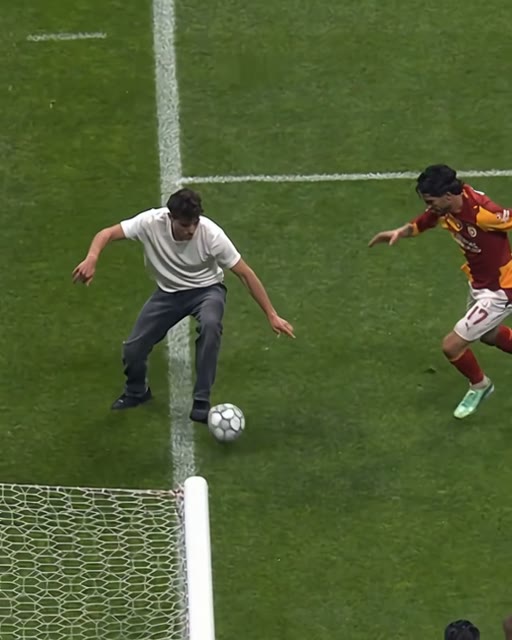
The man from the photo takes the ball to the goal line, the post and net in the corner.
Related Articles
- How to Make the Lamine Yamal Rabona AI Video From One Photo (3 Steps) — the three steps, the best photo and the answers people ask for.
- What Is the Lamine Yamal Fake Rabona AI Trend? (Real vs AI) — the real Champions League move, the grandma version, and how the AI remakes took off.
- Lamine Yamal CapCut Template Not Working? Here's Why — which template the tutorials link, and what to use instead.
- Best Lamine Yamal Rabona AI Generators (2026): 9 Tools Compared — every tool that makes the trend, side by side.
