
How to Make the Ozil Goal AI Video From One Photo (3 Steps)
How to make the Ozil goal AI video: upload 1 photo and get a 15-second clip with the trend's original sound right in your phone browser for $9.90.
 Ozil AI Team8 min read
The team behind Ozil AI writes step-by-step guides to the Ozil goal AI trend, with screenshots from our own maker.

TL;DR — You make the Ozil goal AI video by uploading 1 photo to Ozil AI in your phone or computer browser. A few minutes later, you've got a 15-second video of that person scoring Mesut Özil's famous goal in the real match footage, with the trend's original sound. You don't need CapCut, an app, a template link, a prompt, or an account. It's $9.90 for one 720p video, paid once.
Scroll through the comments on any viral clip and you'll see people asking "How" and "Prompt" under every single post. As a comment under one Uncle Phil post asked, "How do i make one??".
Most tutorials send you into an editing app that doesn't actually generate the scene. The real fix takes one photo in your browser to give you 15 seconds of your person chipping the keeper, dodging two sliding defenders, and rolling the ball home.
Here's what you get: the three steps, the photo that works best, and straight answers to the questions people ask in the comments.
How Do You Make the Ozil Goal AI Video?
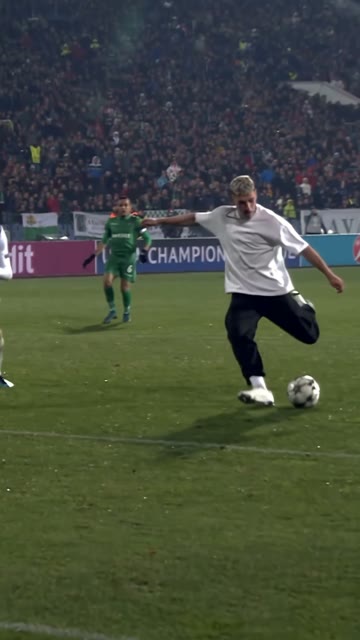
Upload 1 photo, and a few minutes later you'll get a 15-second, 9:16 vertical MP4 of that person scoring Özil's goal, with the trend's original sound. The system handles the entire scene by blending your image directly into the broadcast footage.
- The goalkeeper: The keeper in white rushes out and dives as the ball lifts over him.
- The defenders: Two defenders in green slide in, one after the other, and slide right past.
- The pitch and crowd: The pitch, the crowd, the match ball, and the floodlights stay as they were in the match footage.
- The camera and timing: The unbroken pitch-level take, the slow-motion speed, and the timing of every touch stay completely untouched.
- The sound: It's the trend's original sound carrying through every clip from start to finish.
- The scorer: The face and hair always come from your photo, showing the same person from the first frame to the last.
- The outfit: Keep My Look preserves the clothes from your photo, while Match Kit swaps them for the navy and yellow kit.
Here's where to start: you can open our Ozil Goal AI maker on your phone right now to build your own clip.
What Do You Need to Make an Ozil Goal AI Video?
To make an Ozil goal AI video, you need three things: 1 photo, a web browser on a phone, tablet or computer, and $9.90 for a 720p video. That's the entire setup.
- The photo: You'll need 1 clear photo of yourself, an adult friend, or a character.
- The browser: You'll need an everyday web browser on an iPhone, Android, tablet, or computer.
- The payment: You'll need $9.90 for a 720p clip, paid once.
You don't need anything else. There's no clip to find, no prompt to type, no timeline editing, and no app to download.
What Are the 3 Steps to Make the Ozil Goal AI Video?
To make the video, upload 1 photo, pick the look and the size, then press Create, pay once, and you'll download the 15-second MP4. The entire process runs on one single screen.
Step 1: Upload One Clear Photo
Open ozil-ai.com in your web browser and tap the "Upload photo" box under the "Your photo" label. Pick 1 photo from your camera roll showing one person or character facing the camera in good light, where full body works best.
Tick the box confirming you have the right to use the photo and that anyone in it is 18 or older.

Step 2: Pick Keep My Look or Match Kit
Pick your style on the look switch to decide how your person appears on the pitch. It's the default setting that keeps the face, hair, and outfit from your photo.
That's how the goal can be scored in a suit, a hoodie, or a cardigan.
Match Kit keeps the face and hair from your photo. It dresses your person in a dark navy shirt with neon-yellow trim, neon-yellow shorts, and neon-yellow socks.
Both looks cost the exact same price.
Next, pick 480p, 720p, or 1080p on the resolution switch.

Step 3: Press Create, Pay Once and Download
The price sits right on the Create button before you pay, reading "Create · $9.90" when you pick 720p. You pay once with no subscription, and there's no account to create before you begin.
Your video starts generating on the same page, and it's ready in a few minutes. You'll download a 9:16 vertical MP4 with the original sound and no watermark on exported video, ready for TikTok and Reels.
If a video fails, the credits come back on their own.

Can You Make the Ozil Goal AI Video Without CapCut?
Yes, Ozil AI makes it in the browser on your phone or computer, so there's nothing to install. You don't have to download an extra video editing app to your device.
Many TikTok tutorials for the trend carry a "CapCut · Try this template" link and the tags #capcut and #capcutpioneer. A CapCut template is a ready-made edit inside the CapCut app that you drop your own photo or clip into. The template that's linked in those posts is called "Ai", made by Future301, and it's an ordinary editing template.
Instead of an editing template, you'll get the real match footage, the full 15 seconds, the original sound, and a custom scorer from one photo. You can read what the Ozil goal CapCut template does to see how that route works. You can make the Ozil goal AI video in your browser right now without touching an editing tool.
Who Can Score the Goal in an Ozil Goal AI Video?
Anyone you've got a photo of can score the goal: yourself, an adult friend or family member (18 or older), or a cartoon, game, or AI-made character. It's the same scorer through the chip, the touch, and both slides.
On October 7, 2026, Brazilian AI creator @willbaiano shared Uncle Phil from The Fresh Prince of Bel-Air scoring Özil's winner against Ludogorets in 2016. He wore his vest and dress shoes, and the clip passed 280,000 likes on Instagram.
A Minecraft villager version passed 2.7 million views on TikTok, and a grandma version passed 470,000 likes on Instagram.
Keep My Look is how their outfits stay on through the entire goal. Check out the story of how the Ozil goal AI trend started, or go ahead and put your friend in Özil's goal.
What Photo Works Best for an Ozil Goal AI Video?
The best photo for an Ozil goal AI video shows one person or one character, face clear, facing the camera, in good light, with full body working best. Clear pictures give the maker the best details to work with.
- The subject: Choose a photo that features one person or character.
- The face angle: Make sure the face points directly toward the camera.
- The lighting: Pick an image captured under good, clear lighting.
- The framing: Use full-body framing so the outfit carries into the video with Keep My Look.
- The age requirement: Use photos of real people who are 18 or older.
That's why this choice matters: the face, hair, and outfit in the video come directly from this one photo.
Ozil Goal AI Video FAQ
How long is the Ozil goal AI video?
The video runs for 15 seconds, from the chip over the keeper to the ball in the net, exported as a 9:16 vertical MP4. That's the exact length that covers the full goal sequence.
Does the Ozil goal AI video have the original sound?
Yes, every video carries the trend's original sound built into the file. You don't have to look for audio files or sync up music separately.
Does it work on iPhone and Android?
Yes, it runs in the web browser of any phone, iPhone or Android, plus tablets and computers, with nothing to install. It opens inside Safari, Chrome, or any mobile browser.
Do I need an account to make an Ozil goal AI video?
No, you press Create, pay once, and it'll start on the same page. To open your videos later, sign in with the link sent to the email you paid with.
Do I need a prompt for the Ozil goal AI video?
No, the real match footage, the 15 seconds, and the sound are already built in, so 1 photo is all it takes. You don't have to describe camera angles or soccer moves.
How much does an Ozil goal AI video cost?
One 15-second 720p video is $9.90, paid once with no subscription. That's the same $9.90 pack that covers a 480p video, and the price sits right on the Create button before you pay. A 1080p video takes the $39.90 pack, and you can see every credit pack on the pricing page.
Ready to Make Your Ozil Goal AI Video Now?
You'll only need 1 photo to get a 15-second clip with the original sound streaming in your browser after a few minutes. You don't have to mess with video timelines or editing apps on your phone.
You can create your Ozil goal AI video for $9.90 and have your friend chipping the goalkeeper tonight.
Related Articles
- What Is the Ozil Goal AI Trend? — the real 2016 goal, Uncle Phil, and how the AI versions took off.
- Ozil Goal AI CapCut Template: Does It Work? — what the template does, and what to use instead.


